Kindle Scribe Colorsoft review: is colour worth the premium?

By Emily Book reviewer Published Updated
Reader-supported: if you buy through my links I may earn a small commission, at no cost to you. I bought this Kindle Scribe Colorsoft with my own money.
On this page
- 01The colour screen: lovely in places, muted overall
- 02Reading in colour: who it is actually for
- 03Writing and notes in colour: the one real trick
- 04Battery: the colour tax
- 05The AI features
- 06The "yellow band" question, answered
- 07What it costs, and is colour worth it over the mono Scribe?
- 08How the Colorsoft compares
- 09Accessories and which colour to pick
- 10Who should buy the Kindle Scribe Colorsoft
- 11Frequently asked questions
I already read and write on the mono Kindle Scribe most evenings, so when Amazon put colour into the same 11-inch body with the Colorsoft, I had one question: is the colour actually worth paying more for? I bought the 32 GB Colorsoft with my own money, kept both on my desk for a few months, and used them side by side for reading, annotating and, because I share a lot of what I read, looking at book covers in colour for once.
Here is where I landed. The Colorsoft is the most capable Kindle Amazon makes and the colour is genuinely lovely in the right places, but it is muted, it costs a clear premium, and for plain-text reading I still prefer the sharper, cheaper mono Scribe. If you read in colour, comics, manga, cookbooks, illustrated and children's books, or you highlight in several shades, it is a treat. If you mostly read novels and take notes, save the money.
My verdict after a few months
A beautifully made colour e-ink reader and notebook with one real party trick (colour writing that appears with no flash) and two real catches (muted colour and weaker battery), sold at a premium price. I love using it, and I still tell most people to buy the mono Scribe unless colour matters to them.
What I love
- Colour writing and highlighting appear instantly, with no refresh flash.
- Book covers, comics and cookbooks look genuinely nice in colour.
- Same excellent Premium Pen, included, with a great eraser.
- Lighter and more manageable than the reMarkable Paper Pro (400 g).
- Everything good about the mono Scribe: big screen, Kindle library, warm light.
What I'd change
- Colour is muted, even in Vivid mode, and looks grainier and darker at low light.
- Battery is clearly weaker than other Kindles; colour use drains it faster.
- It is expensive: a clear premium over the mono Scribe.
- Same note-taking limits as the Scribe: fussy Active Canvas, no layers, basic templates.
- Still locked to Amazon, and still not waterproof.
Specifications at a glance
| Display | 11" colour E Ink, 300 PPI mono / 150 PPI colour |
|---|---|
| Front light | Yes, warm + cool, auto-brightness |
| Storage | 32 GB / 64 GB |
| Colours | Graphite, Fig |
| Weight | 400 g |
| Pen | Kindle Premium Pen, included (eraser + button) |
| Battery | Weeks of light reading; nearer a week with heavy writing/colour |
| Waterproof | No |
How the KT Score is built
MethodologyFour weighted pillars, explained on the methodology page.
The colour screen: lovely in places, muted overall
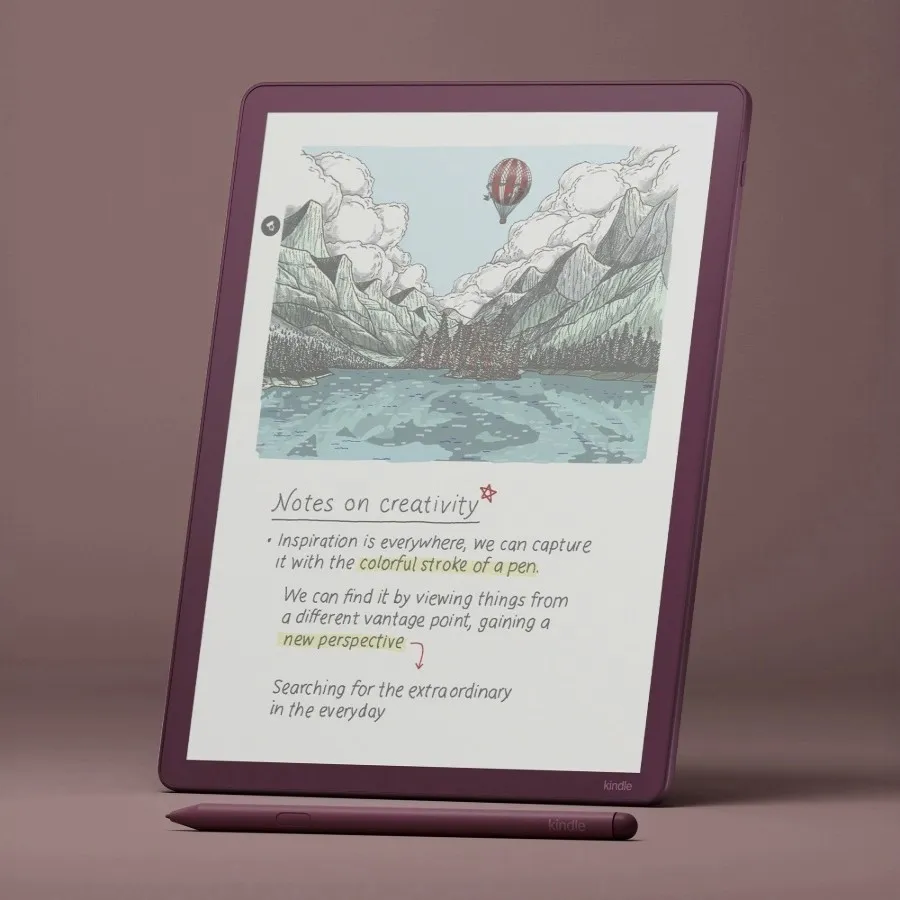
Colour is the whole reason this model exists, so let me be straight about it. E Ink colour is reflective, not backlit, so it looks like good newspaper colour rather than a glossy screen. Even in the "Vivid" setting the colours are gentle, and at low brightness the screen looks a little darker and grainier than the crisp monochrome Scribe. I keep the front light at around 40% or higher when I read in colour, and it looks its best in a well-lit room.
That sounds like a takedown, and it isn't, because in the right content colour earns its place. Comic and manga pages look great, cookbooks finally show the food, and seeing book covers in colour on the home screen is a small daily pleasure that matters more to me than I expected. Just go in knowing colour on E Ink is about usefulness and calm, not saturation.
Reading in colour: who it is actually for
After a few months, my colour reading falls into clear buckets. Comics, manga and webtoons are the strongest case, with the big 11-inch screen showing a full page comfortably. Cookbooks and illustrated non-fiction are the next best, where colour photos and diagrams genuinely help. Children's and picture books are lovely to share. For plain novels, honestly, I reach for the mono Scribe or my Paperwhite, because black text is sharper and the battery lasts longer.
One niggle worth knowing: you still cannot highlight or annotate inside comics and manga, which feels like a missed trick on a device that is both a reader and a notebook.
Writing and notes in colour: the one real trick
The writing hardware is the same lovely Premium Pen as the mono Scribe, and here colour adds something real: when you write or highlight in colour, the ink appears in its final colour instantly, with no refresh flash. If you have tried colour writing on a reMarkable, where the stroke fills in a beat later with a flash, you will feel the difference at once. I colour-code my notes and annotate PDFs in a few shades, and it feels natural.
The rest of the note experience matches the Scribe, for better and worse. There are ten pen colours, five highlighter colours and a nice new Shader tool for soft, watercolour-like fills. But it is still the Scribe's simple notebook app, with the same fussy Active Canvas for writing inside books, no layers and basic templates. If serious note-taking is your goal, this does not change the reMarkable's advantage.
Battery: the colour tax
This is the clearest cost of colour. The Colorsoft's battery is weaker than other Kindles, and colour content pulls it down faster. Light reading still stretches to a couple of weeks, but with daily writing and colour I charge it far more often than my mono Scribe, and charging is not especially fast. It is not a dealbreaker, but if the month-long Kindle battery is part of why you want an e-reader, know that colour costs you some of it.
The AI features
They are the same as the mono Scribe, so I will keep this short. The handwriting search that indexes my notes is the one I actually use and it is genuinely handy, if occasionally hit-or-miss. Note summaries, "Story So Far", "Ask this Book" and sending notes to Alexa are all present and all fine rather than essential. None of them are a reason to choose the Colorsoft over the mono Scribe.
The "yellow band" question, answered
If you remember headlines about a yellow strip on a Kindle Colorsoft, that was the small colour Kindle e-reader from 2024, not this Scribe Colorsoft. Some early units showed a yellow band along the bottom of the screen, Amazon acknowledged it, paused shipping and issued a fix and replacements. I looked for it specifically on my Scribe Colorsoft and did not see it, and the major reviews of this model do not report it. I would still inspect a new unit in its return window, as you should with any screen, but this is not the 2024 situation.
What it costs, and is colour worth it over the mono Scribe?
The Colorsoft costs a clear premium over the mono Scribe with a front light, and the Premium Pen is included in both. That premium is the whole decision, because the two devices are otherwise the same 11-inch body, pen and software. My honest rule: pay for colour only if you will actually read or mark up in colour. If your reading is mostly black text and your notes are mostly black ink, the mono Scribe looks sharper, lasts longer and saves you money. If comics, cookbooks, illustrated books or multi-colour highlighting are a real part of your week, the Colorsoft is worth it.
How the Colorsoft compares
| Device | Screen | Colour | Colour writing | Best for |
|---|---|---|---|---|
| Kindle Scribe Colorsoft | 11" | Yes | Instant, no flash | Colour readers who also write |
| Kindle Scribe (mono) | 11" | No | n/a | Most readers: sharper, cheaper |
| reMarkable Paper Pro | 11.8" | Yes | Flashes in | Serious note-takers |
| Boox Note Air 5C | 10.3" | Yes | Instant | Android apps and flexibility |
| Kobo Libra Colour | 7" | Yes | n/a | Cheap colour reading, open ePub |
| Apple iPad (A16) | LCD | Yes | n/a | Everything except e-ink calm |
- vs the mono Kindle Scribe.
- Same device plus a colour layer for a higher price. Covered above: pay for colour only if you will use it. For most people the mono Scribe is the smarter buy.
- vs reMarkable Paper Pro.
- This is the real colour-writing rivalry. The reMarkable is the better note-taking tool, with more refined writing software and the ability to edit notes from your phone. The Colorsoft counters with brighter, more saturated colour, colour writing that appears with no flash, a lighter body, and the entire Kindle library behind it. If you write far more than you read, lean reMarkable. If you want colour reading plus writing in one lighter device, the Colorsoft wins.
- vs Boox Note Air 5C.
- The Boox runs Android, so it has apps, a browser and Kindle, and colour too. It does much more and feels more like a slow tablet than a calm reader, and it is less beginner-friendly. Pick Boox for flexibility, the Colorsoft for a focused Kindle experience.
- vs Kobo Libra Colour.
- Much cheaper and smaller, with open ePub and library support, but it is a 7-inch reader, not an 11-inch writing device. If you want affordable colour reading without Amazon's walls, it is a smart pick; it is not really in the same class as a tool.
- vs iPad.
- Different tools, as always. The iPad does everything in vivid colour and glows; the Colorsoft does a few things calmly on e-ink. Buy the Colorsoft because it is not an iPad.
Accessories and which colour to pick
The Premium Pen is included, so your first buy is a folio to protect the screen and prop it up. The Colorsoft comes in Graphite and a softer Fig shade; it is purely cosmetic, so pick whichever you like. Keep spare nibs, and choose 32 GB or 64 GB up front if you keep big comic or PDF libraries, since storage is not expandable.
Who should buy the Kindle Scribe Colorsoft
Buy it if colour reading is a real part of your life (comics, manga, cookbooks, illustrated or children's books), if you highlight and colour-code heavily, and if you want the best colour e-ink reader-and-notebook in one and will pay a premium for it. It suits bookish people who want covers and illustrations in colour, and note-takers who want colour without the reMarkable's writing flash.
Skip it if you mostly read plain text (the mono Scribe is sharper and cheaper), if serious note-taking is your main goal (a reMarkable is the better writer), if you want the longest battery (colour costs you some), if you read outside the Kindle Store (look at Kobo or Boox), or if you need waterproofing.
After a few months of using both, the Colorsoft is the one I pick up for comics and cookbooks and the mono Scribe is the one I pick up for novels and notes. The colour is lovely where it counts and muted everywhere else, and whether that is worth the premium comes down to one honest question: will you really read in colour?
Frequently asked questions
Is the Kindle Scribe Colorsoft worth it?
If you read or mark up in colour (comics, manga, cookbooks, illustrated books, multi-colour highlighting), yes. If you mostly read plain text and take black-ink notes, the cheaper mono Kindle Scribe is the smarter buy.
Colorsoft or the mono Kindle Scribe?
Same 11-inch device, pen and software; the Colorsoft adds colour for a higher price. Pay for colour only if you will actually use it.
Kindle Scribe Colorsoft or reMarkable Paper Pro?
The reMarkable is the better note-taker; the Colorsoft has brighter colour, colour writing with no flash, a lighter body and the Kindle library. Choose by whether you write more or read more.
Does the Colorsoft have the yellow screen problem?
That affected some 2024 Kindle Colorsoft e-readers, not this 2025 Scribe Colorsoft. Reviews of this model do not report it; still, inspect any new unit within its return window.
How good is the colour?
Useful rather than vivid. E Ink colour is muted and looks best in good light; it is great for covers, comics and cookbooks, not for iPad-like saturation.
How long does the battery last?
Weeks for light reading, but noticeably less with daily writing and colour, and less than the mono Kindles. Charging is not especially fast.
Graphite or Fig?
Purely cosmetic. Both are the same device; pick the colour you prefer.